Skip to content

All Your Classroom Tools in One Place

PrepPanel handles the logistics so you can focus on teaching.

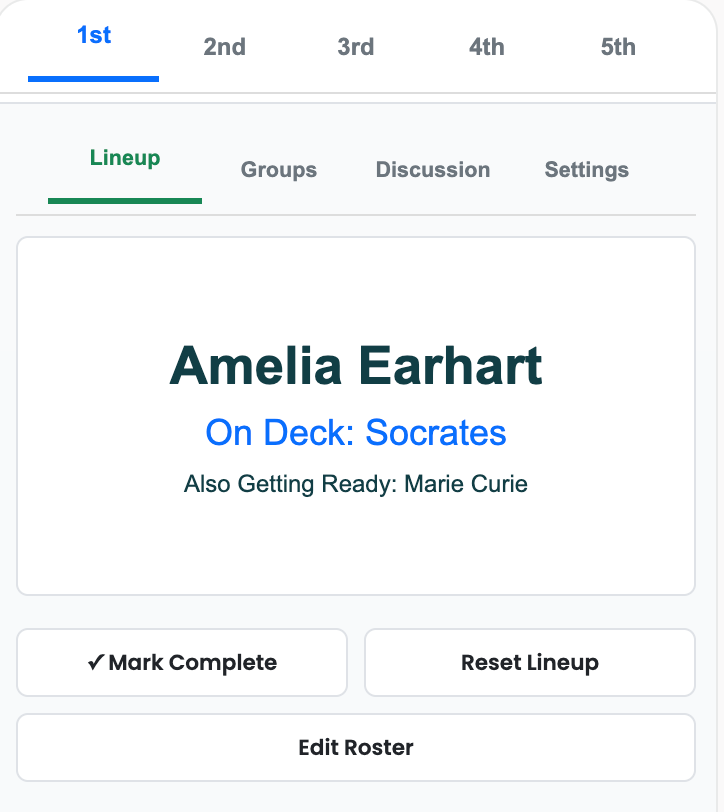
🎯 Queue-Based Calling with Wait Time

Quality Responses from Everyone, Zero Anxiety

PrepPanel's queue system solves the impossible tradeoff: volunteers give great answers but only a few students talk, while cold calling gets everyone involved but answers suffer.

How It Works:

  • Shuffles your class into a randomized queue at the start
  • Students see their turn coming (built-in wait time)
  • When their name appears, they've already prepared their thoughts
  • No repeats, no gaps, no surprise gotchas
  • Reset the queue anytime for a fresh shuffle
  • Skip students or undo the last call

The Result: You get the participation of cold calling with the quality of volunteers, minus the anxiety, embarrassment, and broken trust.

Queue-Based Calling Interface

πŸ—£οΈ Discussion Protocol Library

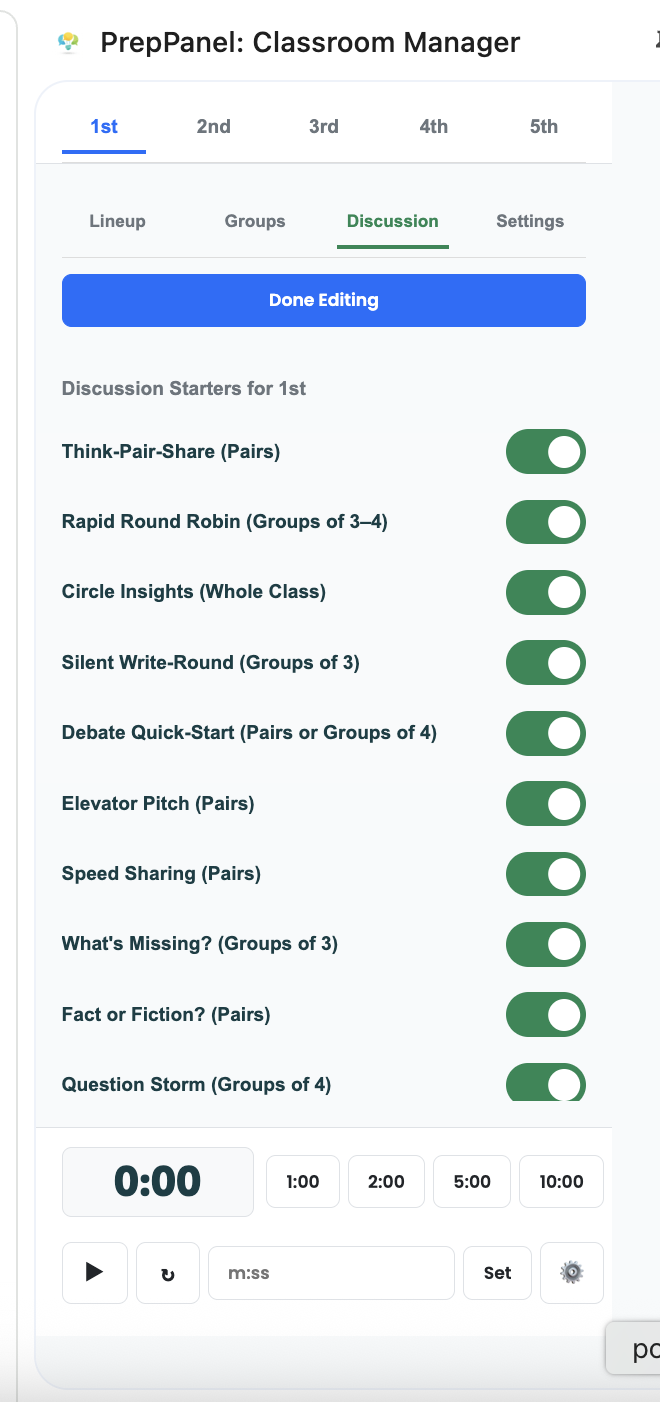
Break Out of Your Think-Pair-Share Rut

Every teacher has a couple of go-to discussion protocols. But using the same one every time? Students get bored, thinking gets stale.

How It Works:

  • Store proven discussion protocols (Think-Pair-Share, Four Corners, Jigsaw, etc.)
  • Add your own custom favorites
  • PrepPanel randomly selects one to keep students thinking in new ways
  • Built-in timer for each phase of the protocol
  • Mix up how students process and discuss

The Result: Keep discussions fresh and engaging without the mental overhead of deciding "which protocol should I use today?"

Discussion Protocol Library

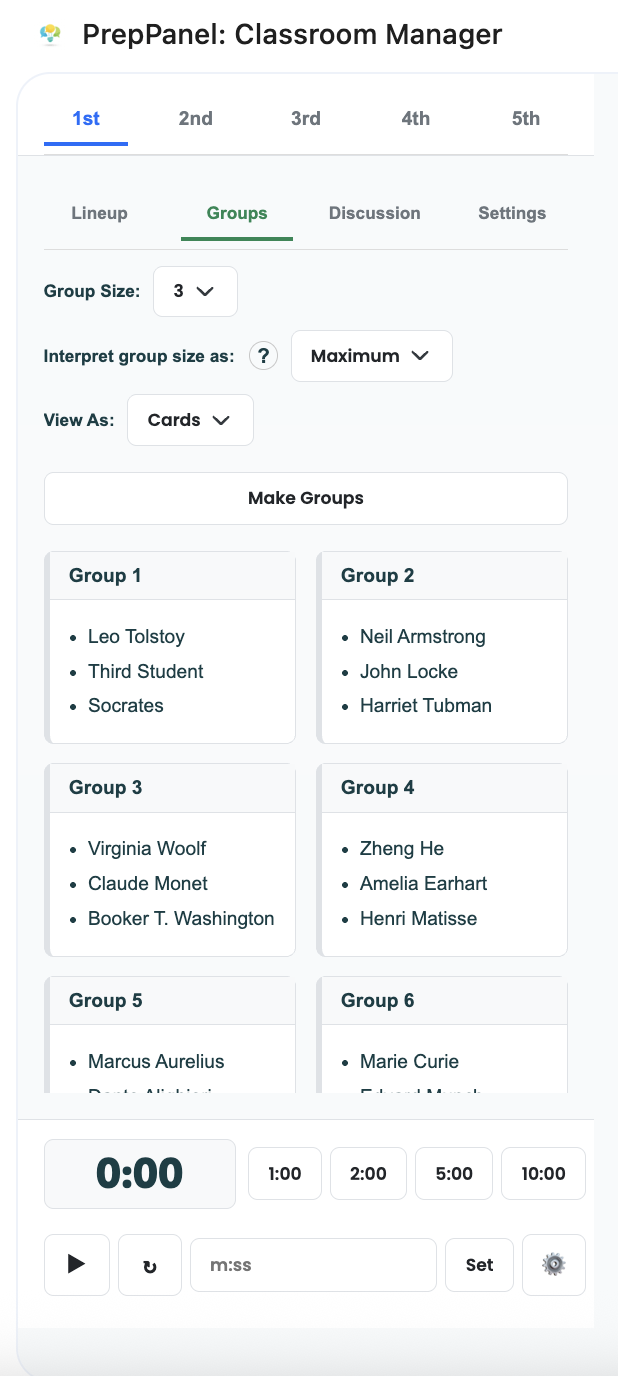
πŸ‘₯ Smart Group Generator

Balanced Groups in Seconds That Actually Work

Manually creating groups that balance ability levels while respecting relationship dynamics takes forever and causes drama. PrepPanel does it instantly.

How It Works:

  • Creates balanced ability groups automatically
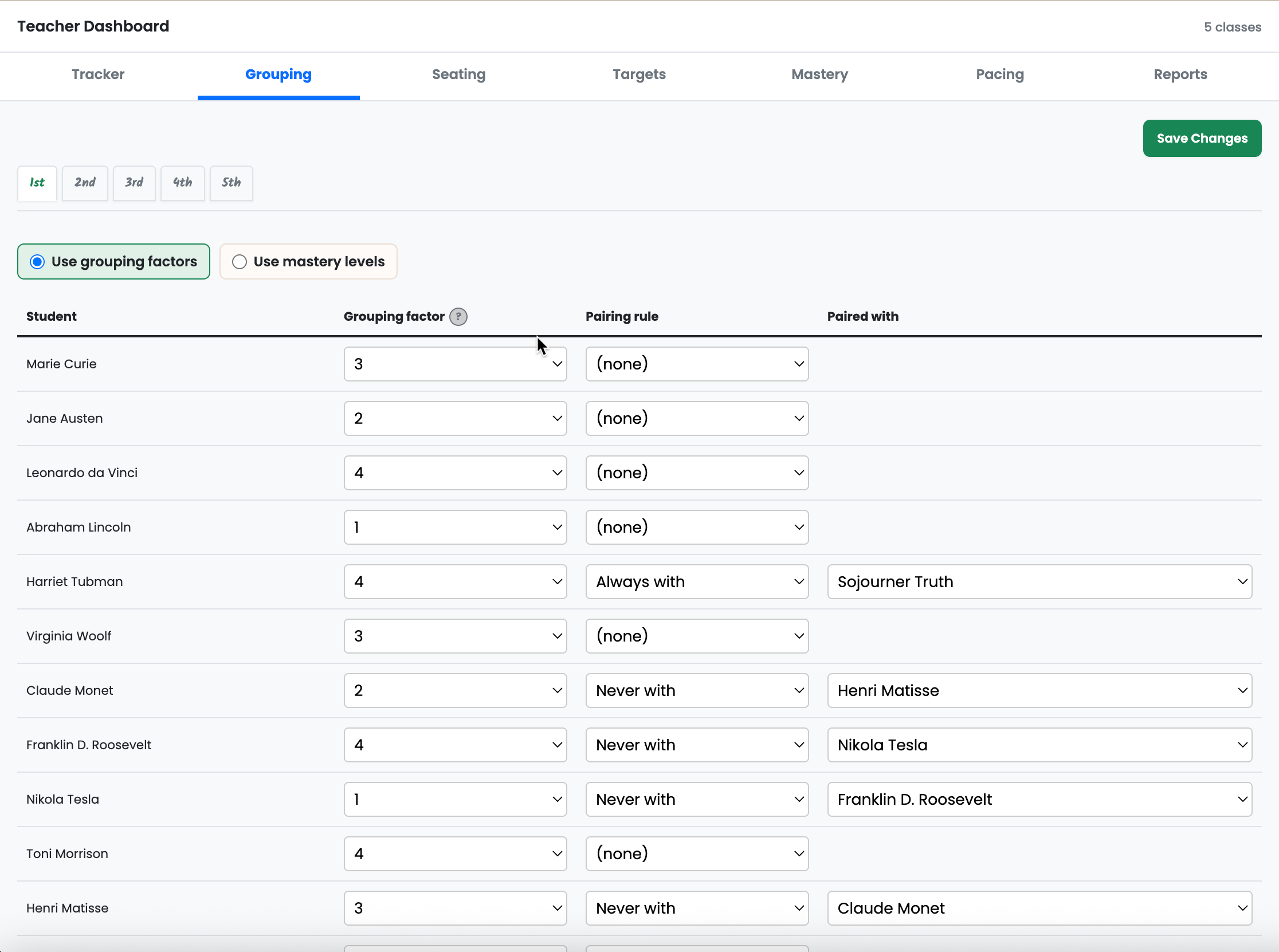
  • Respects your relationship rules:
    • "Always together" pairs stay in the same group
    • "Never together" pairs stay apart
  • Customizable group size (2-10 students)
  • Option to group by mastery level for targeted instruction
  • Auto-generate reteach groups from struggling students
  • Automatically excludes absent students

The Result: Groups that balance learning while respecting dynamics. No manual sorting, no drama, no "why am I with them again?" complaints.

Smart Group Generator Grouping Factors and Pairing Rules

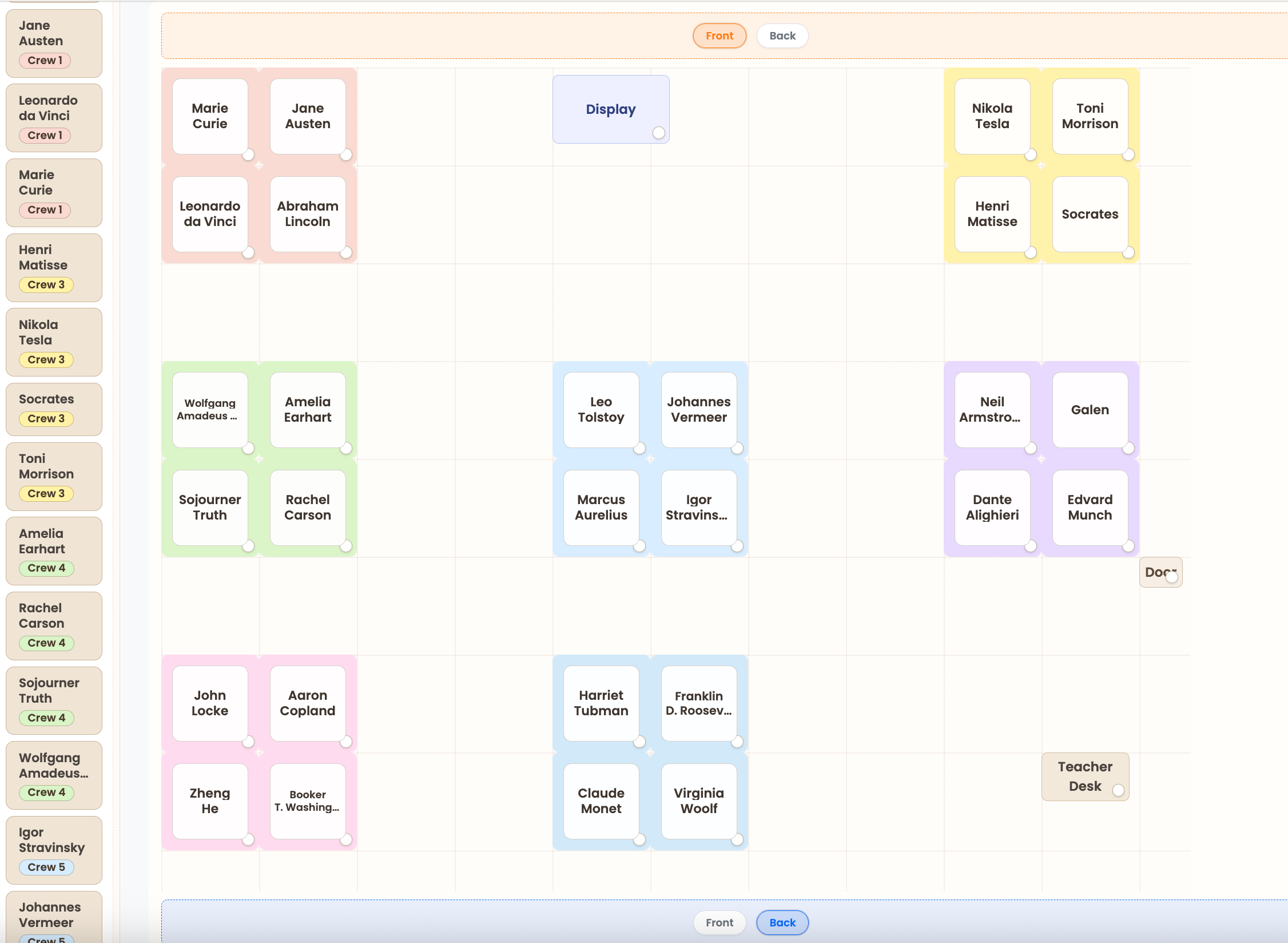
πŸ’Ί Seating Chart Maker

Drag-and-Drop Charts with Intelligent Auto-Seating

Strategic seating is mental Tetris: balancing needs, relationships, ability diversity, and physical space. PrepPanel lets you create custom layouts and handles the optimization.

How It Works:

  • Visual Seating Builder: Drag-and-drop seat positioning with custom layouts
  • Table/Group Organization: Create and label table groups with colors
  • Save Multiple Layouts: Different arrangements for different activities
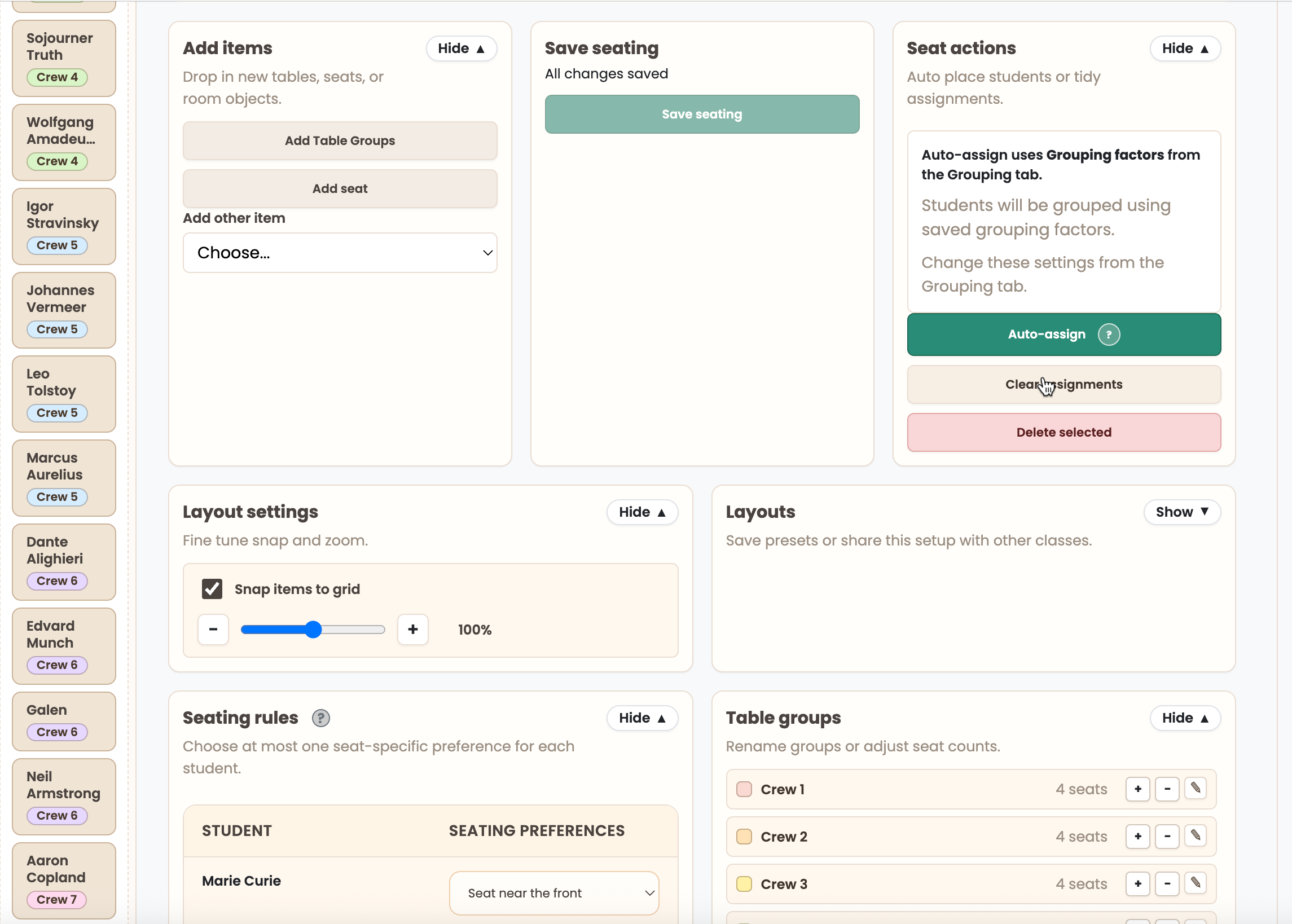
  • Intelligent Auto-Seating:
    • Respects seating needs (near front, near door, near display)
    • Keeps required partners together
    • Separates students who can't sit together
    • Diversifies ability levels within each table
    • Handles table capacity constraints
    • Warns about conflicts when constraints clash

The Result: Strategic seating in seconds, not 20 minutes of mental gymnastics. Custom layouts when you need control, intelligent auto-assignment when you need speed.

Seating Chart Maker Seating Rules and Auto-Assign Settings

πŸ“Š Participation Quality Tracking

Track Response Quality Over Time, Not Just Totals

Counting how many times students speak misses the point. PrepPanel tracks response quality so you can see growth patterns and identify who needs support.

How It Works:

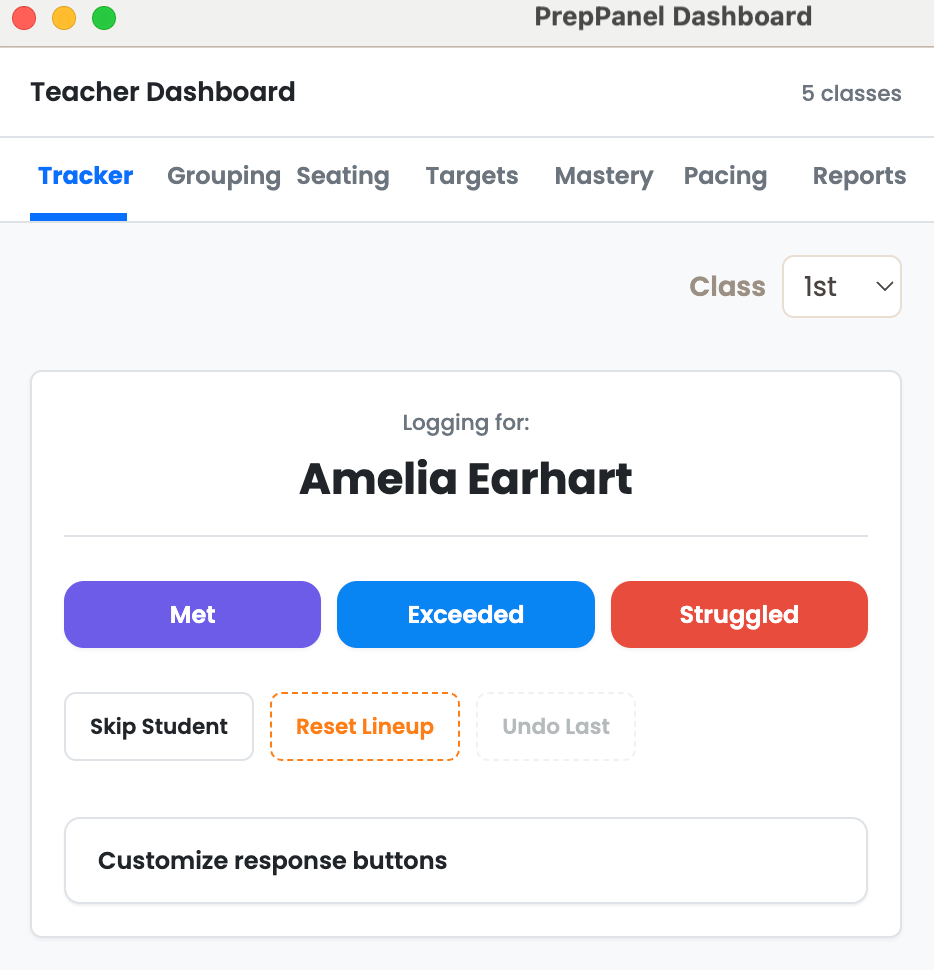
  • Log quality of each response (Met/Exceeded/Struggled, customizable)
  • Customize status labels and colors to match your rubrics
  • Time-stamped entries for every participation moment
  • See patterns: Who's consistently growing? Who's struggling?
  • Undo last entry if you logged incorrectly
  • Export logs for intervention planning

The Result: Data-informed decisions about who needs support, not gut feelings about who talks most. Evidence for parent conferences and intervention planning.

Participation Quality Tracking

🎯 Mastery Evidence Tracker

Real-Time Formative Assessment Without Disrupting Flow

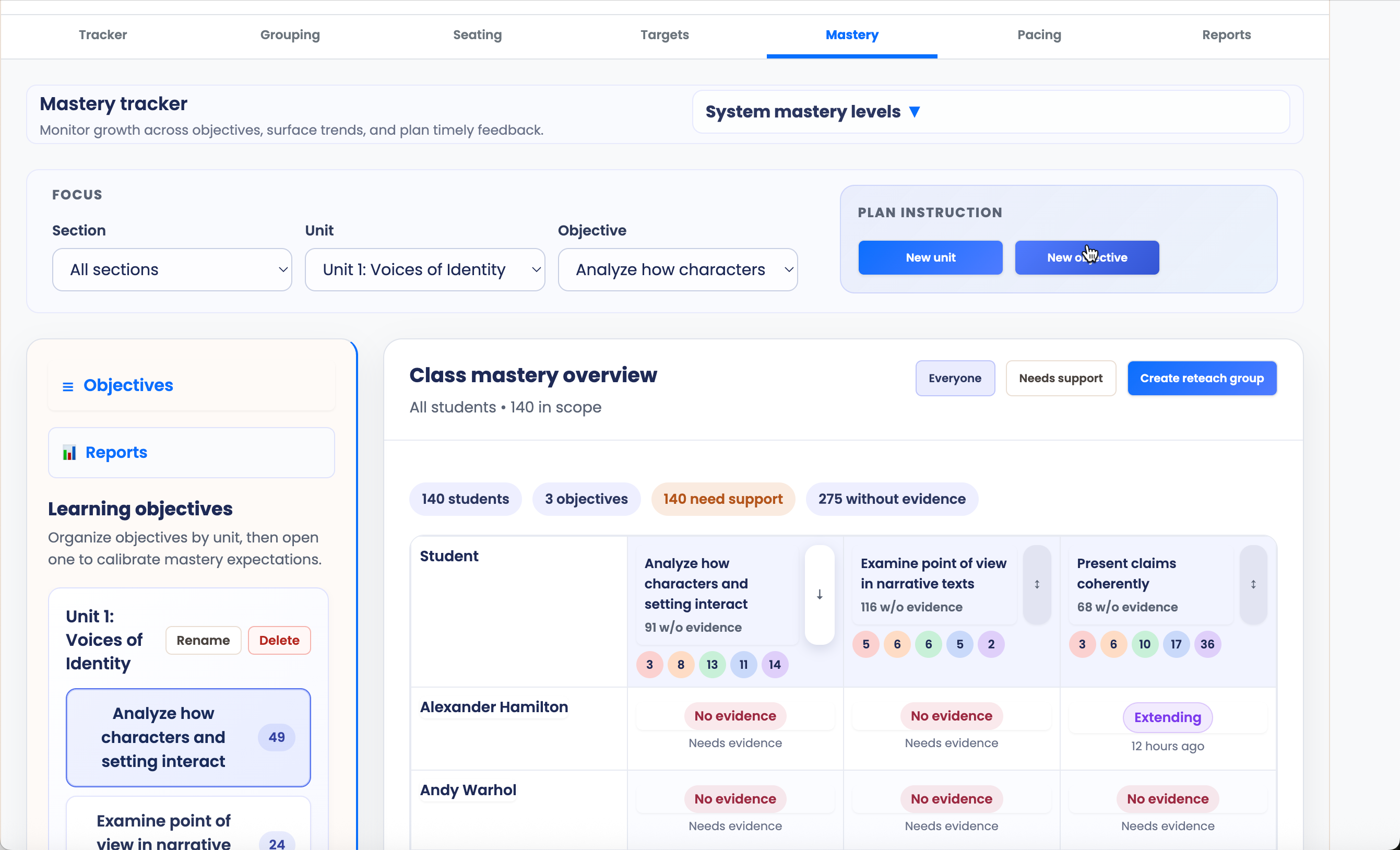
Gradebooks track summative scores. PrepPanel tracks formative evidence in real-time so you know exactly who needs help on what, backed by time-stamped data.

How It Works:

  • Customizable mastery levels with editable labels
  • Time-stamped evidence entries with notes
  • Track mastery by learning objective per student
  • Stale evidence detection alerts you to outdated data
  • Integration with grouping: Create groups by mastery level
  • Auto-identify students needing reteach
  • CSV export for IEPs and parent conferences
  • Printable mastery reports

The Result: Know exactly who needs help on what, backed by evidence, not guesses. Create intervention groups automatically from mastery data.

Mastery Evidence Tracker

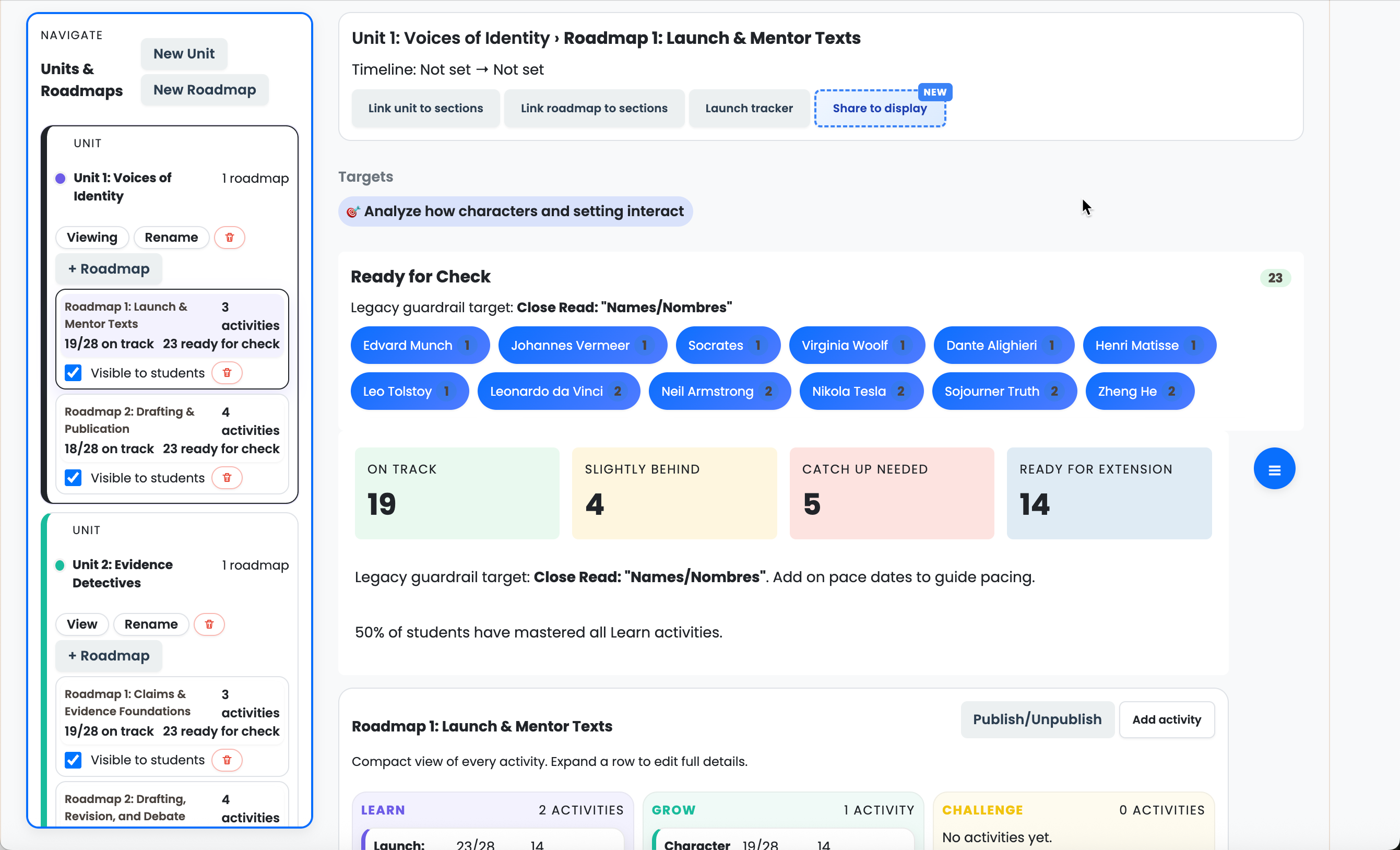
πŸ—ΊοΈ Self-Paced Roadmap Creator

Every Student Masters Content at Their Own Pace

Traditional one-pace-fits-all instruction leaves some students behind and others bored. PrepPanel's roadmap system lets students master content even if it takes different amounts of time. Aligned with Modern Classrooms Project philosophy.

How It Works:

  • Build customizable roadmaps for each unit
  • Multi-unit structure with multiple roadmaps per unit
  • 3-tier activity system (Learn, Grow, Challenge)
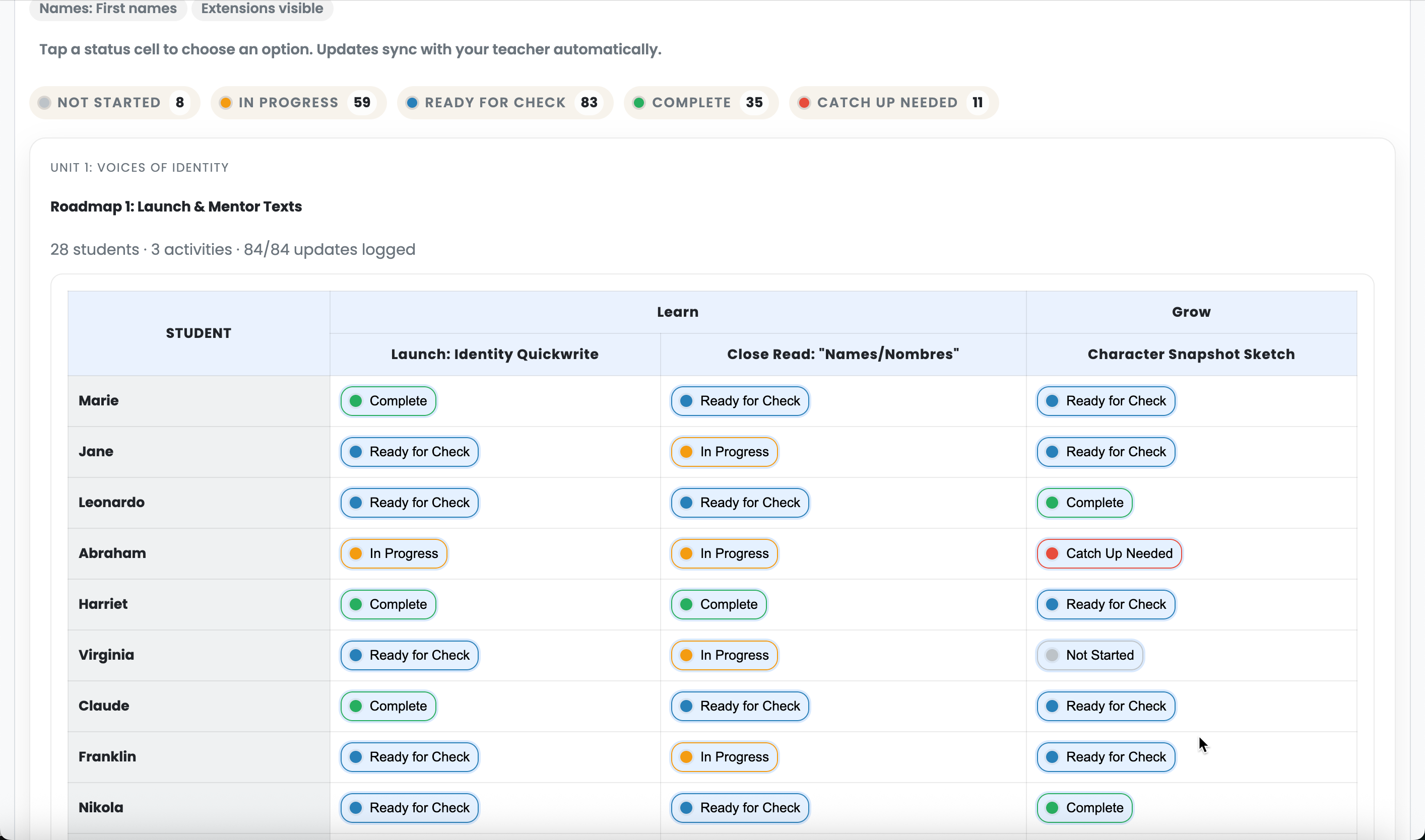
  • Student status tracking: Not Started β†’ In Progress β†’ Ready for Check β†’ Complete β†’ Catch Up Needed
  • Students know exactly what they're working on and what's next
  • Notes and custom status tracking per student
  • Milestone and on-pace date tracking

BONUS: Live Pacing Sync

  • Project pacing board on classroom display via WebRTC
  • 2-way editing: Students update progress, teachers facilitate
  • Students stop asking "what should I be doing?"
  • Real-time presence awareness

The Result: Every student reaches mastery, even if timing varies. Students work independently with clear roadmaps. Teachers facilitate instead of lecture.

Self-Paced Roadmap Setup Live Pacing Sync Display

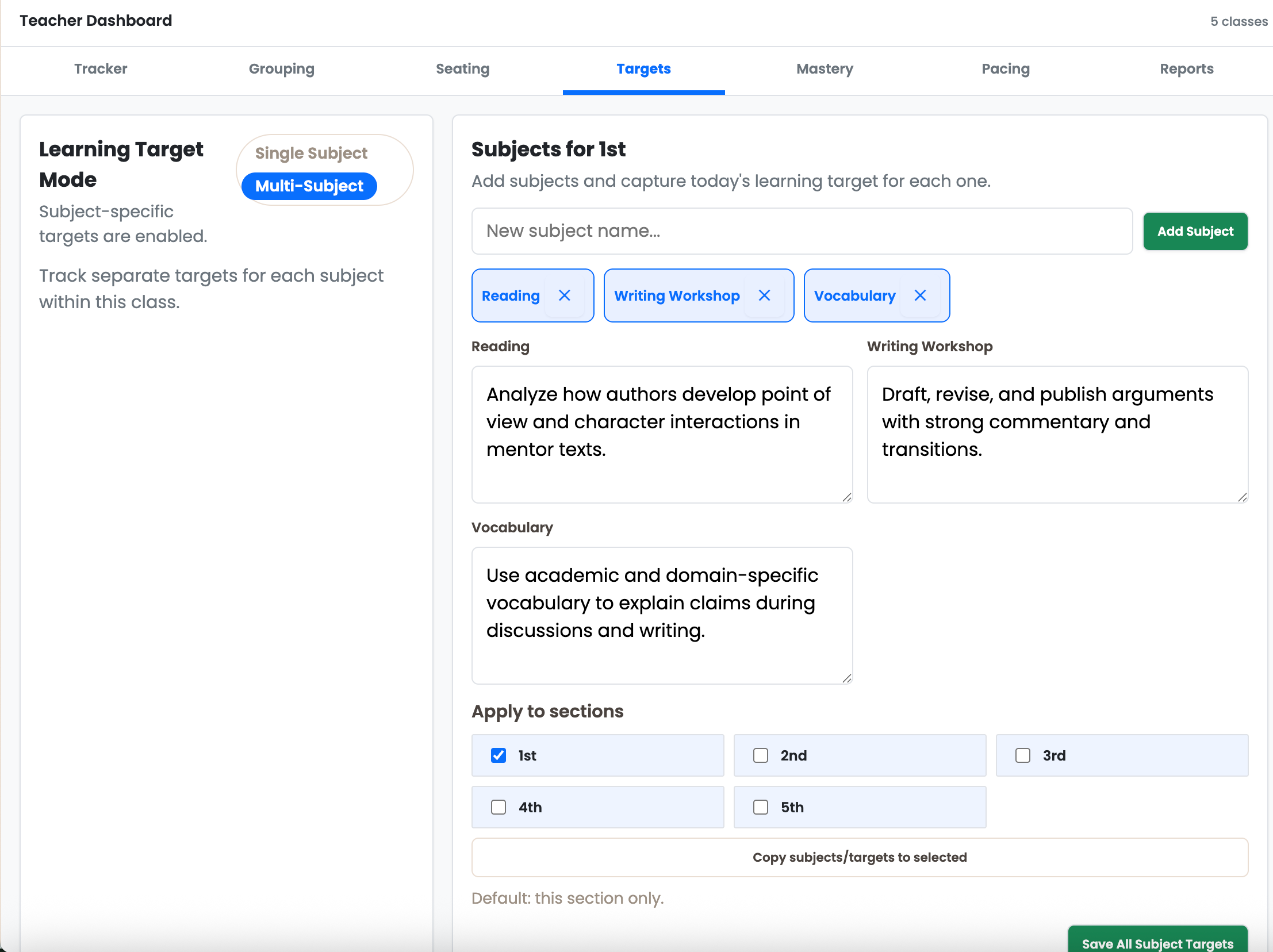
🎯 Learning Targets Display

Students Always Know What They're Learning

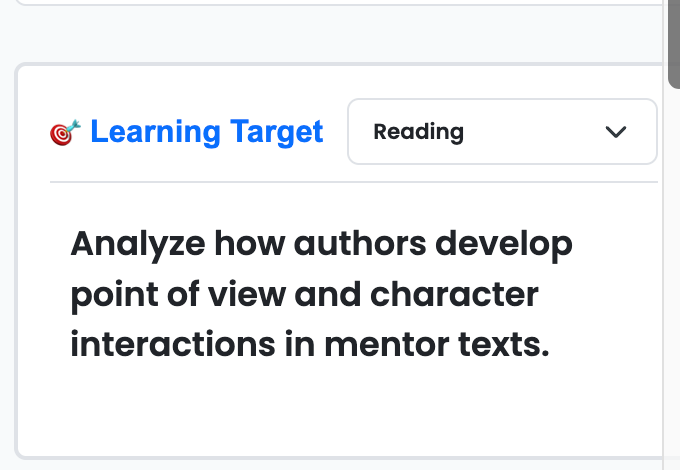
You're already posting learning targets, either on your board (cluttered, noisy) or in a tab/LMS (not always visible when you're toggling between tools). PrepPanel keeps them front and center.

How It Works:

  • Optional setup area in main side panel
  • Post your daily learning target where students can always see it
  • Single subject teachers: Apply to specific sections
  • Multiple subjects (elementary): Set targets per subject and toggle between them
  • No more "What are we learning today?" interruptions
  • Aligned with Hattie's Visible Learning research

The Result: Students always know what they're learning, not buried in an analog mess or hidden in a tab you've toggled away from.

Learning Targets Dashboard with Multi-Subject Mode Learning Target Display Card

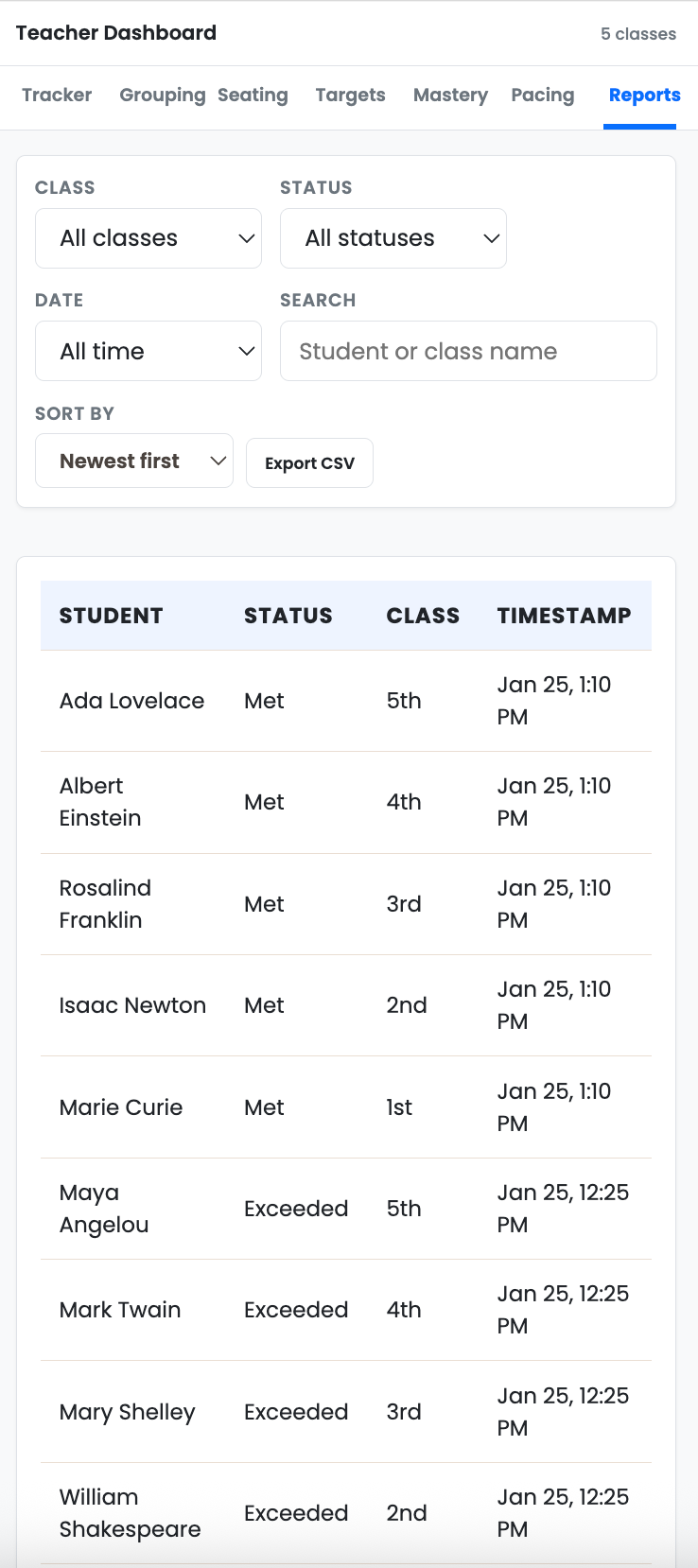
πŸ“ˆ Reports & Export

Turn Classroom Data into Actionable Insights

All the tracking in the world doesn't help if you can't analyze or share the data. PrepPanel makes it easy to search, filter, and export everything.

How It Works:

  • Searchable participation log table
  • Filter by class, quality level, date range
  • Sort by newest, oldest, or student name (A-Z)
  • Date range filters (today, 7 days, 30 days, 90 days, all time)
  • CSV export of participation logs
  • CSV export of mastery data
  • Mastery snapshots for decision-making

The Result: Evidence for parent conferences, IEP meetings, intervention decisions. Export data for analysis or share with admin.

Reports and Export

Ready to simplify your classroom workflow?

Get started with PrepPanel for free on the Chrome Web Store.

Install Free on Chrome